What is the E Pauti Odisha Portal?
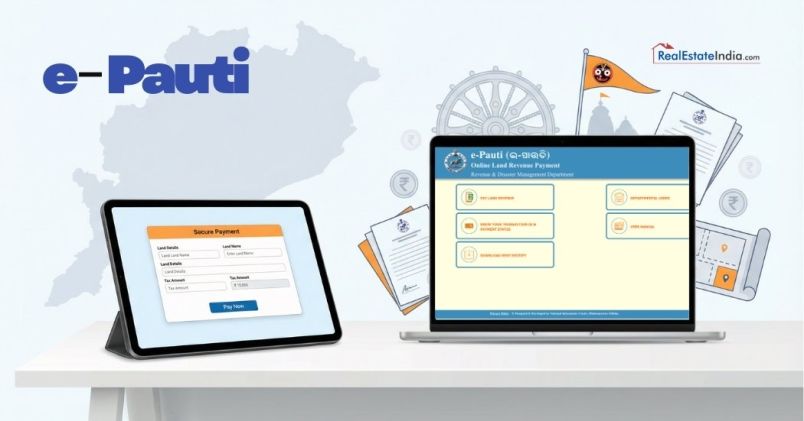
E Pauti Odisha is a government web portal to pay land revenue (known as Khajana) in Odisha. The portal was launched in August 2020 by the Revenue & Disaster Management, and it enables services at the Govt offices to reach you.
Also, this was developed by the National Informatics Centre, Bhubaneswar, to bring all the 30 districts of Odisha under one system for the digitization of land revenue collection. The site odishalandrevenue.nic.in provides you with a complete solution for all your land tax needs.
So, be it your agricultural land, house land or commercial space, this portal makes your yearly tax payment very much simplified.
Key Services Available
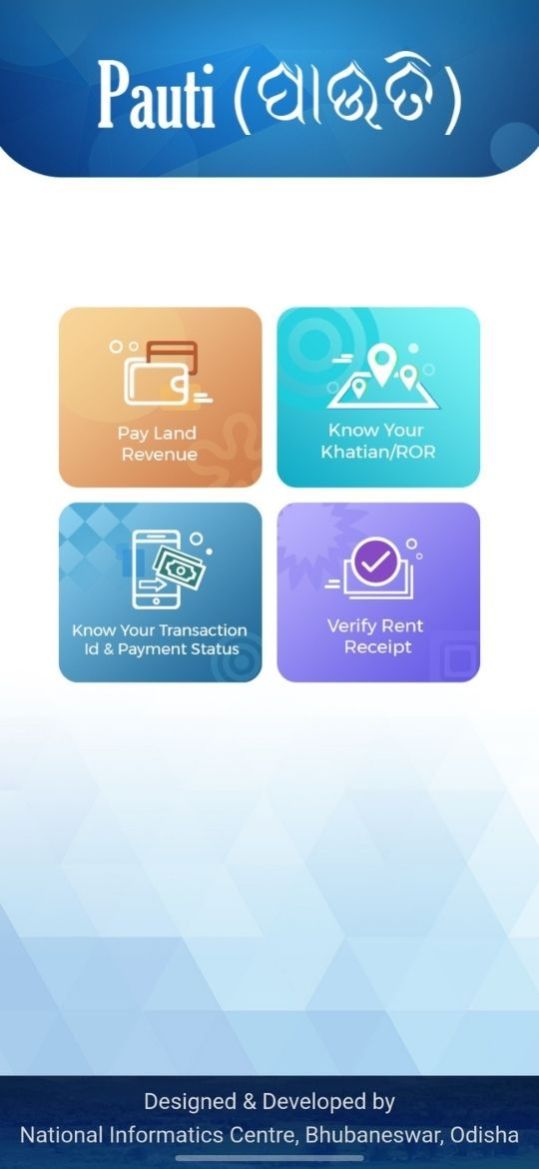
The portal offers multiple services beyond just payment:
- Pay Land Revenue: Complete your annual Khajana payment online
- Download Rent Receipt: Get your payment proof (Pauti) instantly
- Know Transaction ID: Retrieve lost payment references
- Check Payment Status: Track your transaction in real-time
- Verify Receipts: Confirm payment authenticity
What are the Key Features of E Pauti Odisha 2026?
The table below follows is the brief information of E Pauti Odisha 2026, which includes important information of the scheme like official website, start date, controlling authority, mode of payment and assistance in operation. Let's have a look at it:
| Feature |
Details |
| Official Website |
odishalandrevenue.nic.in |
| Launch Date |
August 2020 |
| Managed By |
Odisha Revenue & Disaster Management Department |
| Payment Methods |
Net Banking, Debit/Credit Cards, UPI |
| Availability |
24/7 access |
| Service Charge |
Free (only tax amount payable) |
| Mobile App |
Yes, available on the Google Play Store |
Why Should Property Owners Use E Pauti?
For anyone involved in Odisha's real estate market, maintaining clear land revenue records is crucial. Here's why this portal matters:
- For Property Buyers: When planning to purchase land or homes, verifying that all land taxes are paid prevents future legal complications. Also, the Digital payment records make due diligence faster and more reliable. Clear tax records are essential whether you're considering property for sale in Odisha or exploring options in specific districts.
- For Property Sellers: For property sellers, clear tax records increase your property's value and speed up transactions. Buyers trust sellers who maintain transparent payment histories, which becomes especially important when listing residential or agricultural land.
- For Real Estate Professionals: Understanding E Pauti demonstrates professionalism and helps close deals smoothly. Whether working with real estate agents in Odisha or consulting independently, guiding clients on maintaining updated tax records prevents last-minute transaction delays.
- For Property Investors: Essentially, for property investors, managing multiple properties across districts becomes easier with centralized online payments and digital record-keeping.
What Documents are Required for E Pauti Payment?
Before starting your online payment, gather these essential details:
Primary Requirements
- Khatiyan/ROR (Record of Rights): This document establishes land ownership
- Khata Number: Your unique land account identifier
- Plot Numbers: Specific plot identification within your Khata
- Financial Year: Current year for payment (e.g., 2025-26)
Location Details
- District name
- Tehsil/Tahasil name
- RI Circle
- Village name
Personal Information
- Registered mobile number
- Email address (optional but recommended)
- Complete postal address
- Relationship with tenant (if paying on behalf)
Payment Method
- Debit/Credit card details, or
- Net banking credentials, or
- UPI-enabled payment apps
Pro Tip: If you do not know your Khata number, visit the Bhulekh Odisha portal first. This gets integrated with E Pauti to enable you to verify land records before payment.
How to Pay Land Revenue Online: Step-by-Step Guide?
Making your Odisha land revenue payment is straightforward. Follow these detailed steps:
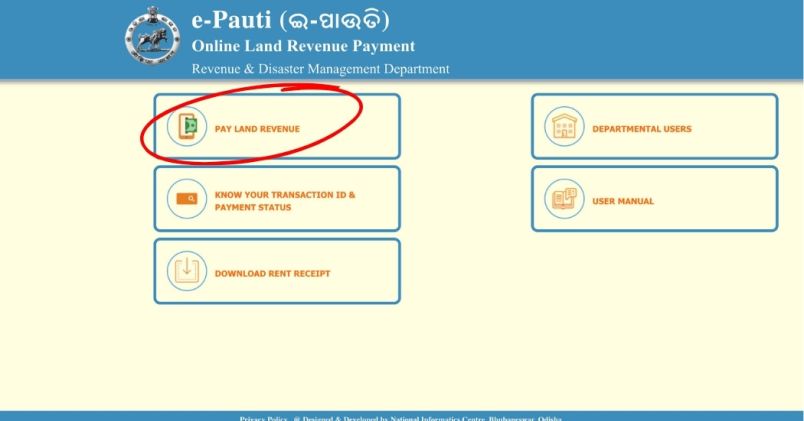
Step 1: Access the Portal
Open your web browser and visit odishalandrevenue.nic.in. The homepage displays four main options. Click on "Pay Land Revenue" to begin the process.
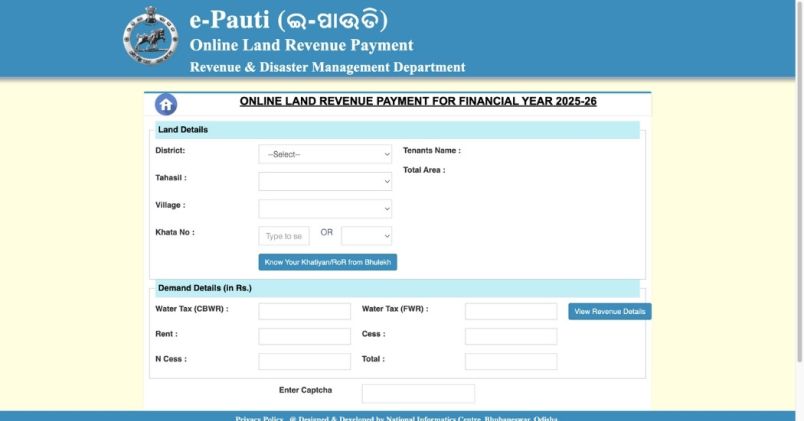
Step 2: Enter Land Details
A new page titled "Online Land Revenue Payment" opens. Fill in all fields carefully:
- Select Financial Year (choose the current year)
- Choose your District from the dropdown
- Select your Tehsil
- Pick your Village
- Enter Khata Number
- Add Plot Numbers (separate multiple plots with commas)
- The system auto-fills Total Land Area and Tenant Name.
The portal automatically calculates pending dues, including:
- Basic Rent
- N Cess (Nistar Cess)
- General Cess
- Water Tax (if applicable)
- Arrears (if any previous dues exist)
Enter the captcha code displayed on screen and click "Proceed".
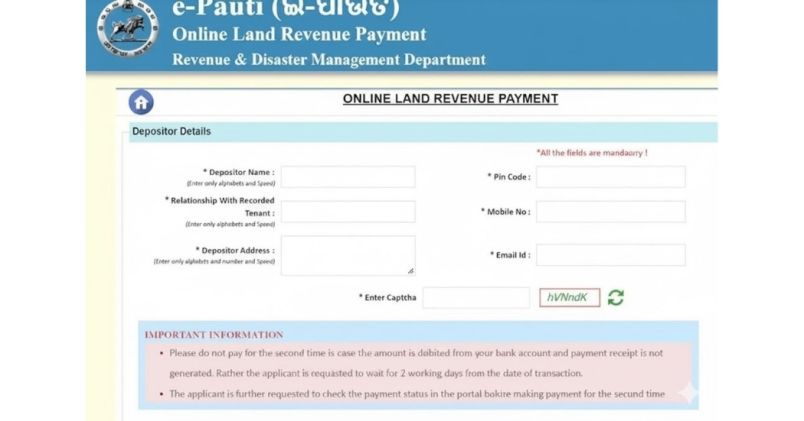
Step 3: Provide Depositor Information
The next page requests depositor details:
- Full Name of the person making payment
- Relationship with recorded tenant (Self/Son/Daughter/Others)
- Mobile Number (for transaction alerts)
- Email Address
- Complete Address with PIN code
Verify all information carefully. Incorrect details can complicate receipt retrieval later.
Click "Make Payment" to continue.
Step 4: Complete the Transaction
You will be redirected to the payment page, where multiple payment options appear:
- Net Banking: All major banks, including SBI, ICICI, HDFC, Axis, and others
- Debit/Credit Cards: Visa, Mastercard, and RuPay cards accepted through the SBI ePay gateway
- UPI Payment: PhonePe, Google Pay, Paytm, and other UPI apps
Select your preferred method and complete the payment following your bank's security procedures.
Important: Don't refresh the page or press the back button during payment processing. This can cause transaction failures.
Step 5: Save Transaction Details
After successful payment, the treasury page displays your transaction confirmation. You'll receive:
- Treasury Challan Reference ID: This unique number is your payment identifier
- Acknowledgment Receipt: Digital proof of payment
Save this information immediately. Take a screenshot or write down the Treasury Challan Reference ID. You'll need it for downloading receipts and future reference.
What Does Your Payment Breakdown Include?
When it comes to land revenue in Odisha, the amount to be paid is not only a single tax liability but a cluster of charges levied with respect to the usage of the land and other concerns. Familiarity with these elements enables the landowners to know what they are paying for and why. Let's have a look at it:
| Component |
Description |
Purpose |
| Rent (Khajana) |
Basic land tax |
Primary government revenue |
| Cess |
Additional levy |
Local development projects |
| N Cess |
Nistar Cess |
Community resource management |
| Water Tax |
Irrigation charges |
For lands receiving irrigation benefits |
| Arrears |
Previous unpaid amounts |
Late payment recovery with penalties |
The portal calculates everything automatically based on your land classification, area, and location. Agricultural land typically has lower rates than residential or commercial plots.
How to Download Rent Receipt (Pauti)?
Your rent receipt serves as legal proof of land tax payment. It's essential for property transactions, mutation services, loan applications, and legal documentation.
Method 1: Immediate Download After Payment
Immediately upon completion of payment, a confirmation page is displayed. Press the "Download Receipt" or "Print" button.
- Your computer's hard drive
- Cloud storage (Google Drive, Dropbox)
- Email it to yourself
Method 2: Download Later Using Transaction ID
If you closed the page before downloading:
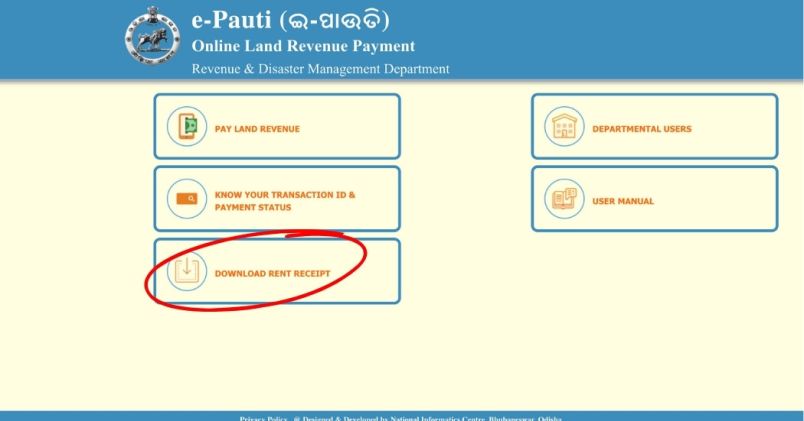
- Return to odishalandrevenue.nic.in
- Click "Download Rent Receipt" on the homepage
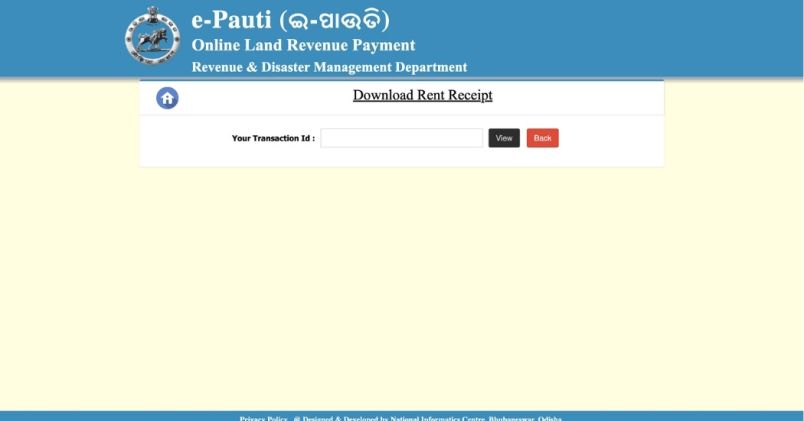
- Enter your Treasury Challan Reference ID
- Click "View"
- Your receipt appears on screen
- Download and save the PDF
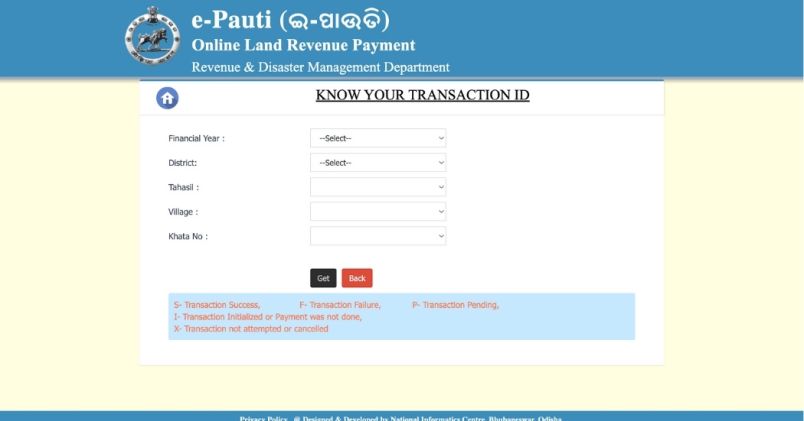
Method 3: Retrieve Lost Transaction ID
Forgot your Transaction ID? Don't worry:
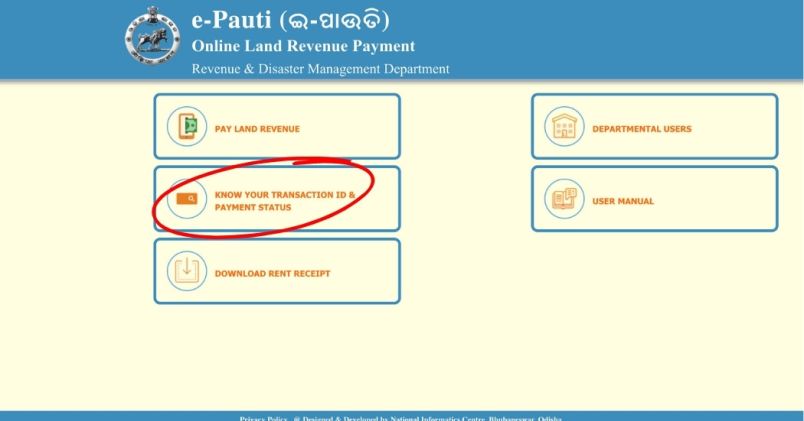
- Click "Know Your Transaction ID and Payment Status"
- Select Financial Year
- Choose District, Tehsil, and Village
- Enter your Khata Number
- Click "Get"
The system displays all recent transactions for your Khata. Find your payment and note the Transaction ID for receipt download.
How to Check Payment Status on E Pauti?
Sometimes internet issues cause payment confusion. Before attempting another payment, always check your status first.
How to Verify Payment Status
- Visit the E Pauti homepage
- Click "Know Your Transaction ID and Payment Status"
- Enter your land details
- Click "Get"
The system shows transaction status using these codes:
- S: Transaction Success - Payment completed
- F: Transaction Failure - Payment did not process
- P: Transaction Pending - Wait for update
- I: Transaction Initialized - Payment not completed
- X: Transaction Cancelled - Payment not attempted
If the status is "Success" and you are not receiving the receipt, use the Transaction ID to download it manually.
How Does E Pauti Mobile App Work?
The Pauti App brings all portal features to your smartphone. This is particularly useful for real estate professionals managing multiple client properties, property investors with land across different districts, landowners living outside Odisha, and anyone needing quick payments while traveling.
Features of the Pauti Mobile Application
- Quick Access: Make land revenue payments without opening a computer
- Offline Receipt Storage: View saved receipts even without internet
- Payment Reminders: Get notifications about upcoming due dates
- Transaction History: Track all your past payments easily
- Khatiyan Access: View your Record of Rights on mobile
- 24/7 Availability: Pay anytime, anywhere with internet access
How to Use E Pauti Mobile App
Download and Setup:
- Open the Google Play Store on your Android phone
- Search for "E Pauti Odisha"
- Download the official government app
- Open and grant necessary permissions
Making Payment Through App:
- Launch the E Pauti app
- Click "Pay Land Revenue"
- Enter land details (same as website process)
- Provide depositor information
- Choose payment method
- Complete transaction
- Save Treasury Challan Reference ID
Downloading Receipt via App:
- Open the E Pauti app
- Click "Download Rent Receipt"
- Enter your Treasury Challan Reference ID
- Click "View"
- Download or share the receipt
The app duplicates the functionality of the website, yet offers more convenience to mobile users.
What are Common Issues and Their Solutions?
Even in the best of systems, users run into trouble sometimes. Here's how to fix the most common problems:
Payment Deducted But Receipt Not Generated
This is the most common concern. If money leaves your account, but you don't receive confirmation:
What Happened: Network timeout during transaction processing
Solution:
- Wait 24-48 hours before taking action
- Check payment status using the "Know Transaction ID" feature
- Save your bank transaction reference number
- Contact the helpdesk at 1800-121-8242 if the issue persists beyond 48 hours
- Don't make duplicate payments immediately
Land Details Not Found
Your Khata or plot numbers don't appear in the system:
Possible Reasons:
- Land records not yet digitized
- The recent property inheritance not updated
- Old records needing manual entry
Solution:
- Visit your local RI (Revenue Inspector) office
- Request tenant ledger update
- Carry your physical land documents
- Allow 7-10 days for digital record update
Wrong Details Entered
You submitted incorrect information and completed payment:
Solution:
- Contact your Tehsil office immediately
- Provide the transaction ID and correct details
- They'll guide you through the correction process
- Refunds typically process within 15-21 days
Website Not Loading or Running Slow
The portal experiences heavy traffic during month-end periods, the last week of the financial year (March), and the first week after property tax notifications.
Solutions:
- Try early morning hours (6-9 AM)
- Access late night (10 PM - 1 AM)
- Use the mobile app instead
- Clear browser cache and cookies
- Try a different browser (Chrome recommended)
- Disable VPN if you're using one
Receipt Won't Download
PDF download fails or shows a blank page:
Solutions:
- Enable pop-ups for odishalandrevenue.nic.in
- Disable ad blockers temporarily
- Try a different browser
- Update Adobe PDF reader
- Download on a desktop instead of a mobile browser
Captcha Keeps Showing Invalid
Difficult-to-read security codes frustrate users:
Solutions:
- Click the refresh icon next to the captcha
- Try uppercase/lowercase variations
- Use a mobile app that has easier captchas
- Ensure no extra spaces when typing
What are Important Precautions and Best Practices?
To ensure smooth transactions and avoid problems on the E Pauti Odisha portal:
Before Payment
- Verify all land details on Bhulekh Odisha first.
- Check the current year's tax demand on the portal.
- Confirm your Khata number is correct.
- Have a stable internet connection.
- Keep payment instruments ready.
During Payment
- Don't refresh or go back during a transaction.
- Ensure single payment session (don't open multiple tabs).
- Enter the correct mobile number for OTP.
- Double-check all entered information.
- Use trusted payment methods only.
After Payment
- Save the transaction ID immediately.
- Download the receipt right away.
- Take a screenshot of the confirmation page.
- Store digital copies in multiple locations.
- Email receipt to yourself.
- Print a physical copy for records.
Regular Maintenance
- Pay before the March 31st deadline annually.
- Keep the digital receipt folder organized by year.
- Update contact details if they change.
- Monitor for government notifications.
- Verify payment reflects in the land records.
When Should You Pay Your Land Revenue?
When to pay enables you to avoid fines. The tax year ends on 31st March and the best time to pay is September to December when the server is not overloaded. The last deadline is 31 March each financial year and a late fee will be added to your account. Interest is compounded annually on late payment.
Along with this, Up-to-date payments for property transactions before listing or buying. Buyers frequently demand proof of ownership for 3-5 years to confirm responsible ownership.
The table below lists the official contact details for quick and reliable support. Let's have a look:
| Support Channel |
Details |
| Helpline Number |
1800-121-8242 |
| Email Support |
revsec.od@nic.in |
| Official Address |
Revenue & Disaster Management Department
Government of Odisha
Bhubaneswar, Odisha - 751001 |
| Working Hours |
Monday-Friday: 10 AM - 5 PM |
| Technical Support |
cybertreasury2023@gmail.com |
For local issues, contact your District Tehsildar office directly. They handle land-specific queries more efficiently.
Conclusion
The E Pauti Odisha Portal 2026 has transformed how property owners interact with government services. Whether you have a small farming land or multiple rental properties, the portal helps you save time, maintain transparency, provide convenience at any time, offer secure digital receipts and remain tax compliant. If you are in real estate or a prospective property buyer in Odisha, you need to be familiar with E Pauti. Accurate land revenue records protect investments and simplify transactions. This is why Start using the portal today to pay dues on time and maintain digital records. Lastly, for finding the best property deals in Odisha, check out RealEstateIndia.
Frequently Asked Questions: About e-Pauti Portal
Q: Is there an offline alternative to E Pauti?
Yes, you can go to the nearest Common Service Center (CSC) and get help to make the E pauti payment. But online payment is quicker and chatting charges are not there.
Q: Can I pay for someone else's land?
Yes, with the right land information and Khata number, anyone can pay. Enter your relationship with the tenant in the depositor information.
Q: What if my land details are wrongly displayed?
Take your documents for your land to the local RI. Once they've done the tenant ledger update, you can pay online.
Q: Do NRIs need a special permission to use E Pauti?
No special permission required, you can file your submission from now on. NRIs can make payments using international cards; however, these payments are subject to additional charges.
Q: How long do you store the digital receipts?
You can never become due expired digital receipt. However, you have to pay yearly - each year's receipt proves that year's tax payment.
Q: Can I get a refund for the wrong payment?
Yes, but it has to be done manually. Take your transaction ID and accurate information to the Tehsil office. Refunds take 15-30 days.
Is the mobile app as secure as the website?
Yes, the official government app is protected by the same security measures as the website. Only download the Google Play Store
What is the difference between Khata and Khatiyan?
Khata is your account number and khatiyan (ROR) is the document in full, which contains land details, ownership and rights









ADD COMMENT